Creating a Custom Mother’s Day Card with Photoshop: A Comprehensive Guide
Mother’s Day is one of the most cherished occasions for expressing love, gratitude, and appreciation to the matriarch in our lives. Whether you're a designer, a hobbyist, or simply someone who wants to create a heartfelt gift, crafting a personalized Mother’s Day card can be both meaningful and rewarding. In this guide, we’ll explore how to design a custom Mother’s Day card using a professional Mother’s Day Card Template Package that includes two high-quality Photoshop (.psd) files, a help file, and all the tools needed to bring your vision to life.
Understanding the Mother’s Day Card Template Package
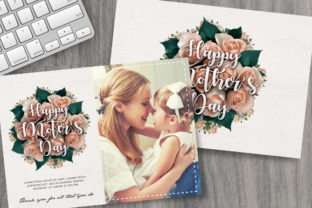
The Mother’s Day Card Template Package is designed to offer flexibility and creativity for users of all skill levels. It includes two Photoshop files—one for the front and one for the back of the card—each sized at 7 x 5 inches with bleed, ensuring they are ready for print. The templates are provided in CMYK color mode at 300 DPI, which is ideal for professional printing. Additionally, the package comes with a help file that provides detailed instructions on how to customize the design, including font links and guidance on inserting images via smart objects.
Key Features of the Template Package
- Two Photoshop Files: One for the front and one for the back of the card, allowing for cohesive and balanced design elements.
- Bleed Size: The 7 x 5 inch size with bleed ensures that the design extends beyond the edges of the card, preventing any white space when printed.
- CMYK Color Mode: Designed for print, the templates use the standard color model used by printers, ensuring accurate color reproduction.
- High Resolution (300 DPI): This resolution is optimal for print quality, making the final product look sharp and professional.
- Customizable Elements: Users can easily modify text, colors, and images, making each card unique.
- Smart Objects for Images: The inclusion of smart objects allows users to insert their own photos or graphics without affecting the layout or quality of the design.
- Font Links in Help File: The help file includes links to fonts used in the template, making it easy for users to download and apply them.
- User-Friendly Interface: The package is designed to be intuitive, even for those new to Photoshop, with clear instructions and helpful tips.
Designing Your Mother’s Day Card: A Step-by-Step Workflow
Designing a Mother’s Day card using the template package is a straightforward process that can be broken down into several key steps. By following these steps, you can create a visually appealing and personalized card that reflects your appreciation for your mother.
1. Opening the Template in Photoshop
Begin by opening the front and back Photoshop files included in the template package. Each file is pre-designed with placeholders for text, images, and other design elements. Familiarize yourself with the layout and note where you can make changes.
2. Customizing Text Elements
The template includes customizable text boxes for messages, names, and dates. You can edit the text directly within Photoshop or import your own text from a document. Make sure to use the fonts provided in the help file for consistency and compatibility.
3. Adding Personalized Images
One of the most impactful ways to personalize a Mother’s Day card is by adding a personal image. The template uses smart objects, which allow you to place your own photos or graphics without altering the original design. Simply drag and drop your image into the designated area, and adjust its size and position as needed.
4. Adjusting Colors and Layout
Use the color palette provided in the template to maintain a cohesive look throughout the card. If you want to change colors, you can do so by selecting the appropriate layers and adjusting the hue, saturation, and brightness. For more advanced customization, you can experiment with layer styles and effects to enhance the visual appeal.
5. Previewing and Printing
Before printing, preview the card to ensure that all elements are properly aligned and that the design looks as intended. Use the print preview feature in Photoshop to check for any potential issues such as misalignment or incorrect bleed areas. Once satisfied, export the file in the required format and send it to a professional printer for high-quality results.
Why Choose a Mother’s Day Card Template?
Using a Mother’s Day Card Template offers several advantages over creating a card from scratch. First, it saves time and effort, especially for those who may not have extensive design experience. Second, it ensures consistency in design elements, making the final product look polished and professional. Third, the templates are highly customizable, allowing you to tailor the design to suit your specific needs and preferences.
Use Cases for the Mother’s Day Card Template
- Personal Gifting: Create a unique and heartfelt Mother’s Day card for your mother or another special woman in your life.
- Business Cards or Promotional Materials: Design custom cards for clients, customers, or employees to express appreciation and build relationships.
- Event Invitations: Use the template to create elegant invitations for Mother’s Day events, family gatherings, or community celebrations.
- Education and Training: Teachers and educators can use the template to create thank-you notes or recognition cards for students and staff.
- Marketing and Branding: Businesses can incorporate the template into their marketing strategy to create branded cards that reflect their values and mission.
Considerations for Designing a Mother’s Day Card
When designing a Mother’s Day card, it's important to consider several factors to ensure the final product is both meaningful and effective. These include the target audience, the purpose of the card, and the overall message you want to convey.
1. Target Audience
The design should resonate with the intended recipient. For example, a card for a young child may feature bright colors and playful illustrations, while a card for an older mother may have a more sophisticated and elegant design.
2. Purpose of the Card
Determine whether the card is meant to express gratitude, celebrate a special occasion, or simply show affection. The tone and style of the design should align with the purpose of the card.
3. Message and Content
The content of the card should be thoughtful and genuine. Include personal messages, memories, or inside jokes that reflect your relationship with the recipient. Avoid generic phrases and focus on what makes your relationship unique.
4. Visual Appeal
A well-designed card should be visually engaging and easy to read. Use a clean layout, appropriate fonts, and complementary colors to enhance the overall aesthetic.
5. Print Quality
Ensure that the design is optimized for print. Check that all elements are properly aligned, the resolution is set to 300 DPI, and the file format is suitable for printing. Consider using a professional printing service to achieve the best results.
Conclusion
Designing a Mother’s Day card using a Mother’s Day Card Template Package is a creative and rewarding way to show appreciation for the people who matter most. With the right tools and guidance, anyone can create a personalized and professional-looking card that conveys their heartfelt message. Whether you're a designer, a hobbyist, or simply looking for a meaningful way to celebrate Mother’s Day, the template package offers the flexibility, features, and support needed to bring your vision to life.