Creating a Professional Black and White Business Card: A Guide to Designing with Adobe Illustrator
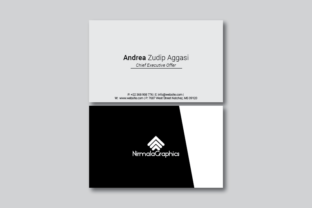
In today's fast-paced business world, a well-designed business card can make all the difference. Whether you're launching a new venture, networking at an event, or simply looking to upgrade your professional materials, a black and white business card template offers both simplicity and sophistication. This article explores how to create a double-sided Adobe Illustrator file that is print-ready, high-quality, and perfect for 9cm x 5.5cm cards with bleed and CMYK color mode.
Why Choose a Black and White Business Card?
A black and white design is not only timeless but also highly versatile. It eliminates the need for color printing, which can be more expensive and less reliable in some printing environments. Additionally, it allows for greater focus on typography, layout, and imagery, making it ideal for designers who want to emphasize clean lines and minimalism.
The black and white business card template is especially useful for professionals in fields like graphic design, branding, and digital marketing. It can be used as a base for customizing with logos, contact details, and other essential information. The monochrome palette also makes it easier to adapt across different media, from printed materials to digital platforms.
Understanding the Specifications
- Size: 9cm x 5.5cm (standard business card size)
- Bleed: 0.25cm (ensures no white edges when printed)
- Resolution: 300 DPI (print-ready quality)
- Color Mode: CMYK (ideal for professional printing)
- Font: Roboto Free Font (clean, modern, and widely supported)
These specifications are crucial for ensuring that your final product looks sharp and professional. When designing with Adobe Illustrator, it’s important to work within these constraints to avoid issues such as pixelation or misalignment during printing.
Designing a Double-Sided Business Card in Adobe Illustrator
Creating a double-sided business card in Adobe Illustrator involves careful planning and attention to detail. Here’s a step-by-step guide to help you get started:
- Set Up the Document: Open Adobe Illustrator and create a new document with the dimensions of 9cm x 5.5cm. Make sure to set the resolution to 300 DPI and choose CMYK as the color mode.
- Create the Bleed Area: Add a 0.25cm margin around the main design area to accommodate the bleed. This ensures that the printed edges don’t have any unwanted white space.
- Choose Your Font: Use the Roboto Free Font for a modern and professional look. This font is available for free and works well with both text and design elements.
- Design the Front Side: Focus on your company logo, name, and contact information. Keep the layout simple and organized. Use contrasting colors to ensure readability.
- Design the Back Side: The back side can include additional information such as a tagline, website URL, or social media links. You can also add a subtle background pattern or texture to enhance visual appeal.
- Export the File: Once your design is complete, export the file as a PDF or AI format. Ensure that all text is converted to outlines and that the file is optimized for print.
Best Practices for a Professional Finish
Here are some best practices to keep in mind when creating your black and white business card:
- Keep It Simple: Avoid cluttering the design with too many elements. A clean layout is more effective and easier to read.
- Use High-Quality Images: If you include images, make sure they are high-resolution and relevant to your brand. Avoid using low-quality graphics that may appear pixelated when printed.
- Test the Print: Before mass production, print a sample to check for alignment, color accuracy, and overall quality. This helps catch any potential issues early on.
- Consider Accessibility: Ensure that your design is accessible to all users, including those with visual impairments. Use high-contrast colors and readable fonts.
Common Misconceptions About Black and White Business Cards
Despite their simplicity, there are several misconceptions about black and white business cards that should be clarified:
- They’re Outdated: While color cards are popular, black and white designs remain stylish and professional. In fact, they often stand out more due to their minimalist approach.
- They Lack Visual Appeal: With the right design choices, black and white cards can be just as visually appealing as their colored counterparts. They offer a unique opportunity to highlight typography and layout.
- They’re Too Basic: A basic design doesn’t mean a lack of creativity. A well-executed black and white card can be a powerful tool for branding and communication.
How to Customize Your Template
Your black and white business card template should be flexible enough to accommodate your personal or business needs. Here are some ways to customize it:
- Change the Layout: Experiment with different layouts to find what works best for your brand. Consider using a split design where one side focuses on text and the other on visuals.
- Add Branding Elements: Incorporate your logo, tagline, or signature into the design. These elements help reinforce your brand identity and make your card more memorable.
- Use Negative Space: Utilize negative space effectively to create balance and draw attention to key elements. This technique is especially useful in minimalist designs.
- Experiment with Text Styles: Play with different text styles, such as bold, italic, or underline, to add visual interest without overwhelming the design.
Conclusion
A black and white business card template is a valuable asset for any professional looking to make a strong first impression. By following the guidelines outlined in this article, you can create a high-quality, print-ready design that meets the needs of your business. Whether you're using Adobe Illustrator or another design tool, the key is to focus on simplicity, clarity, and professionalism.
Remember, a well-designed business card isn't just about aesthetics—it's about communication. It serves as a tangible representation of your brand and can open doors to new opportunities. So take the time to craft a design that reflects your values and goals. With the right approach, your black and white business card can become a powerful tool in your professional toolkit.