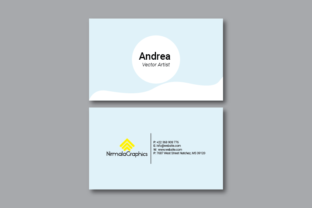
Understanding Business Card Templates: A Comprehensive Guide for Designers and Entrepreneurs
In today’s fast-paced business world, a well-designed business card can make all the difference. Whether you're launching a new startup, expanding your professional network, or simply looking to enhance your personal brand, having a professional business card is essential. One of the most effective ways to create high-quality cards is by using business card templates, especially those designed in Adobe Illustrator. In this article, we’ll explore what these templates are, why they matter, and how to use them effectively for print-ready results.
What Are Business Card Templates?
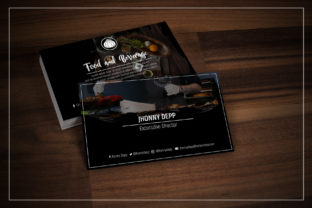
A business card template is a pre-designed layout that provides a framework for creating custom business cards. These templates typically include placeholders for text, images, and design elements, allowing users to customize the look and feel without starting from scratch. For designers and entrepreneurs, using a template can save time, ensure consistency, and help maintain a professional appearance.
When it comes to print-ready business cards, the choice of file format and design specifications is crucial. Many professionals prefer Adobe Illustrator (AI) files because they offer scalability, vector-based graphics, and precise control over design elements. This makes AI files ideal for both digital design and high-quality printing.
Why Use Adobe Illustrator for Business Card Designs?
- Scalability: Vector graphics in AI files can be resized without losing quality, making them perfect for various print sizes.
- Flexibility: You can easily modify colors, fonts, and layouts to match your brand identity.
- Professional Output: AI files are commonly used in commercial printing due to their precision and compatibility with print-ready workflows.
- Design Control: With Adobe Illustrator, you have full control over typography, shapes, and effects, which is vital for creating visually appealing cards.
Key Specifications for Print-Ready Business Cards
Creating a print-ready business card involves more than just designing an attractive layout. It requires attention to detail and adherence to specific technical standards. Here are some key specifications to consider when working with a business card template:
Size and Bleed
The standard size for a business card is 9cm x 5.5cm, which is widely accepted for international printing. However, to ensure that your design extends beyond the edges of the card, it's important to include a bleed area. A bleed of 0.25cm on all sides allows for minor misalignment during the printing process and ensures that your design appears clean and polished.
Resolution and Color Mode
To achieve high-quality prints, your design should be created at a resolution of 300 DPI (dots per inch). This ensures that your image appears sharp and clear when printed. Additionally, it's essential to work in CMYK color mode, as this is the standard for offset and digital printing. Using RGB color mode may result in unexpected color shifts when the design is sent to print.
Font Selection
Choosing the right font is critical for readability and professionalism. The Roboto Free font is a popular choice for business cards due to its modern, clean, and versatile design. It works well across different languages and is available for free, making it an excellent option for designers who want to avoid licensing fees.
How to Use a Double-Sided Business Card Template in Adobe Illustrator
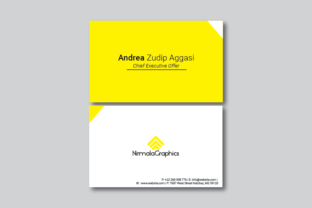
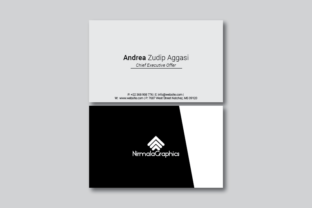
Double-sided business cards are becoming increasingly popular as they allow for more creative expression and information sharing. Here’s a step-by-step guide on how to use a double-sided business card template in Adobe Illustrator:
- Open the Template File: Launch Adobe Illustrator and open the provided double-sided business card template file (.ai).
- Customize Text Elements: Use the text tool to edit the placeholders for your name, title, company, contact details, and any additional information you wish to include.
- Adjust Font and Color: Select the Roboto Free font and choose colors that align with your brand identity. Ensure that your text is legible and easy to read.
- Add Graphics or Logos: If your template includes space for images or logos, insert them carefully. Make sure they are placed within the designated areas and do not extend into the bleed zone.
- Check Layout and Alignment: Review your design to ensure that all elements are properly aligned and that the overall layout is balanced and visually appealing.
- Export for Printing: Once your design is complete, export the file in a suitable format such as PDF or EPS, ensuring that it meets the required resolution and color mode specifications.
Common Misconceptions About Business Card Templates
While business card templates are incredibly useful, there are several misconceptions that can lead to subpar results. Here are a few common ones:
- “Templates Limit Creativity”: On the contrary, templates provide a solid foundation that allows you to focus on customization rather than starting from scratch. They also ensure that your design adheres to industry standards.
- “They’re Only for Beginners”: Experienced designers often use templates as a starting point, especially when they need to create multiple variations quickly or maintain brand consistency across different materials.
- “They Don’t Allow for Customization”: Most modern templates are highly customizable, offering layers, editable text boxes, and adjustable design elements to suit your needs.
Conclusion: The Role of Business Cards in Modern Business
Despite the rise of digital communication, business cards remain a powerful tool for networking and brand building. A well-designed card can leave a lasting impression, convey professionalism, and serve as a tangible reminder of your brand. By using a double-sided business card template in Adobe Illustrator, you can create a print-ready design that meets both aesthetic and functional requirements.
Whether you're a small business owner, a freelancer, or a student, understanding the importance of design specifications and choosing the right tools can significantly enhance the impact of your business cards. With the right template, you can create a professional, eye-catching, and memorable business card that stands out in today’s competitive market.
If you're looking to create a high-quality business card, consider using a professionally designed AI template that meets all your printing requirements. With the right approach, your business cards can become an essential part of your branding strategy.